Do you have a problem or a question relating to your Apple products? Apple offers a variety of tech support options for its customers. Some of the support options include (a) phone (b) live chat (c) email support. However, you may need to get hands-on, personal support and help from an Apple expert, especially if you are having a hardware problem (like a cracked screen problem, water damage, etc). You may have to bring your device to your nearest Apple Store.
Apple offers tech support inside every Apple Retail Store. This support is offered by the Genius Bar stations. Employees of the Genius Bar, called Geniuses, specially trained to help customers with Apple hardware and software.
In order to visit the Genius Bars, you may need to make a reservation. You can make a Genius Bar reservation online before visiting the Apple Store. This article explains how you can make an Apple Genius Bar reservation.
What is the Genius Bar
The Genius Bar is a hands-on technical support station located inside Apple’s retail stores. When you have questions or need support for your Apple products, such as Mac, iPad, Apple TV, Apple Watch, AirPods, or iPhone, you can get expert advice and training at the Genius Bar in any Apple Retail Store.
The Genius Bar employees, called Geniuses, are specially trained and certified Apple experts. The main jobs of the Geniuses are to help Apple users with hardware and software. They can answer your questions, provide personal supports, and offers repairs. Most of the services they provide are free. They can do repairs, but you have to pay for non-warranty services if your device is not covered by the Apple warranty, an AppleCare plan.
You can easily setup Genius Bar appointment. The company offers two ways to make a Genius Bar reservation at an Apple Store:
- You can book the appointment using the Apple Store app or,
- You can make a reservation via the Apple support website.
1. Make a Genius Bar reservation using Apple Support App for iOS(the easiest way)
- Open the Apple Support app on your iPhone (if you do not have it, launch the App Store and download and install it — or click here)
- Select Support option at the bottom of the screen.
- Select your device. For the purpose of this article, we selected iPhone 16 Pro Max and then Repairs & Physical Damage and Unable to power on. Note that some problems will only let you receive support via phone calls or live chat sessions.
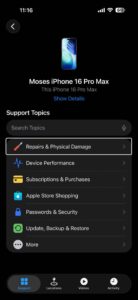
- Tap Make a Reservation and find a location and date and time and then tap Reserve. Then your reservation will be made.
2. Make a Genius bar appointment via Apple web site
Without downloading and installing an app, you can also make a Genius Bar reservation via Apple’s support website. Here is how:
- Go to Apple’s Genius Bar web site. (URL: https://www.apple.com/retail/geniusbar/)
- Tap Get started to make a reservation.
- Sign in with your Apple Account.
- Select your device. For the purpose of this article, we chose iPhone 16 Pro Max.
- Choose your issue. For the purpose of this article, we chose Repairs & Physical Damage and Unable to power on.
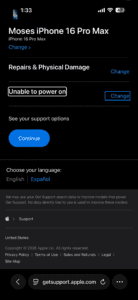
- Tap continue.
- Tap Find a location (Make a Reservation)
- Choose your location. You can search by address, city or zIP Code. You can also browse all Apple retail stores. Find the closest Apple Store that you want to go to.
- Select the date and time, then tap continue.
- Review your reservation details., then tap Reserve now. Your reservation will be confirmed.
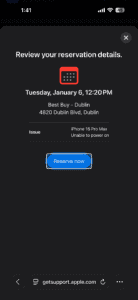
Now you have your Genius Bar reservation. Apple will also send you a confirmation email. You can easily manage your Genius Bar appointment. You can easily cancel or reschedule it if you want to. Make sure you back up your device before going.
How to prepare for your appointment
Before your appointment, you may want to prepare for your appointment. Do not forget to back up your data (you can use iCloud. Make sure to bring all of the hardware (that you are having issues with) with you. For example, if you are having issues with your Mac, bring all of the accessories such as your mouse, keyboard. You may also be asked for your sales receipt.
Make sure that you know your Apple account password (you may have to turn off Find My).
And lastly, do not forget to bring your ID with you.
Your Genius Bar appointment may last about 15 minutes. If your device needs a hardware repair, the Genius will discuss with you regarding your repair options. This may include any applicable charges.